Popular font pages
Instagram fonts: make your name and bio look like you
Instagram gives every profile the same plain text. igramfonts turns your words into 120+ styled versions — 𝓬𝓾𝓻𝓼𝓲𝓿𝓮, 𝐛𝐨𝐥𝐝, 𝔤𝔬𝔱𝔥𝔦𝔠, ꜱᴍᴀʟʟ ᴄᴀᴘꜱ, ⓑⓤⓑⓑⓛⓔ and many more — that you can copy and paste straight into your Instagram name, bio, captions and comments. No app, no sign-up, nothing to install.
Type once at the top of the page and every style updates live. Tap Copy on the one you like, or tap ✨ to dress it up with frames, hearts, stars, faces and line marks before you copy. You can preview any style on a mock profile with 👁 before it goes on your real one.
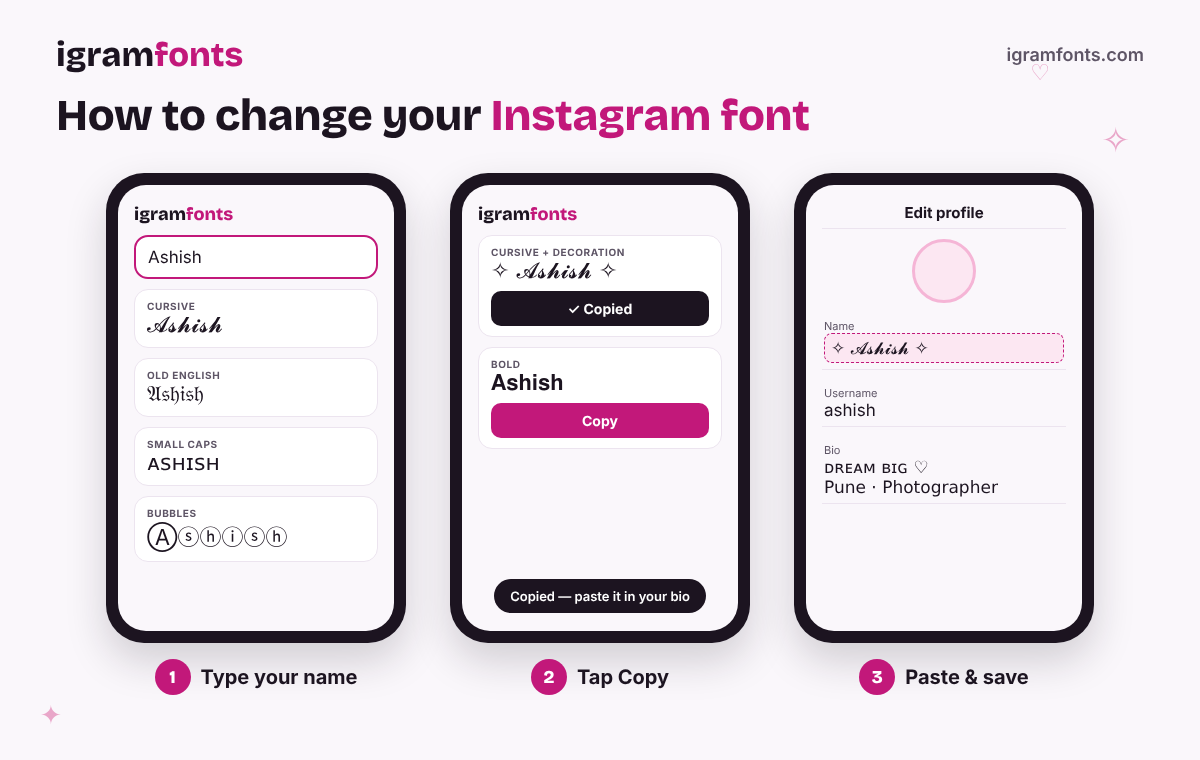
How to change your Instagram font (step by step)
- 1Type your text. Write your name, bio line or caption in the box at the top. Use Enter for a new line — the styles keep your line breaks.
- 2Pick a style. Scroll the list or use the chips (Cute, Bold, Aesthetic, Colour names…). Tap ✨ to decorate it, or 👁 to see it on a profile.
- 3Copy it. Tap Copy. Your last copies stay in the “Recently copied” row so you can grab them again.
- 4Paste into Instagram. Open your profile → Edit profile → tap Name or Bio → paste → Done. For posts, paste into the caption box; for comments and stories it works the same way.
Why these “fonts” work on Instagram
Instagram doesn't let you upload or choose fonts. What you copy here aren't font files at all — they are Unicode characters, special letters that already exist in the same character set as emoji. The letter 𝓐 is its own character, just like 😀 is. Because they're characters and not formatting, they keep their look when you paste them into Instagram, WhatsApp, Facebook, X, TikTok, Discord or a game nickname.
That also explains the few limits: if a phone doesn't have a drawing for a rare character, it shows an empty box instead. Most of our styles use characters that every modern Android phone and iPhone can display.
Where to use stylish text on your profile
The bold line under your photo. It's searchable, so keep your real name readable — style part of it, or use a clean style like 𝐁𝐨𝐥𝐝 or 𝓒𝓾𝓻𝓼𝓲𝓿𝓮. Up to 30 characters.
Up to 150 characters across a few lines. Mix one fancy line with plain text so it stays easy to read — see the ready-made bios above.
Style a headline or one key line, not the whole caption. Long blocks of fancy text are hard to read and screen readers may skip them.
Short words like “𝓐𝓫𝓸𝓾𝓽”, “ᴛʀᴀᴠᴇʟ” or “♡ 𝒻𝒶𝓂𝒾𝓁𝓎 ♡” make highlight titles stand out.
Username tip: your @username only accepts letters, numbers, full stops and underscores, so fancy fonts won't work there. Use them in your Name and Bio instead.
Font styles you can create
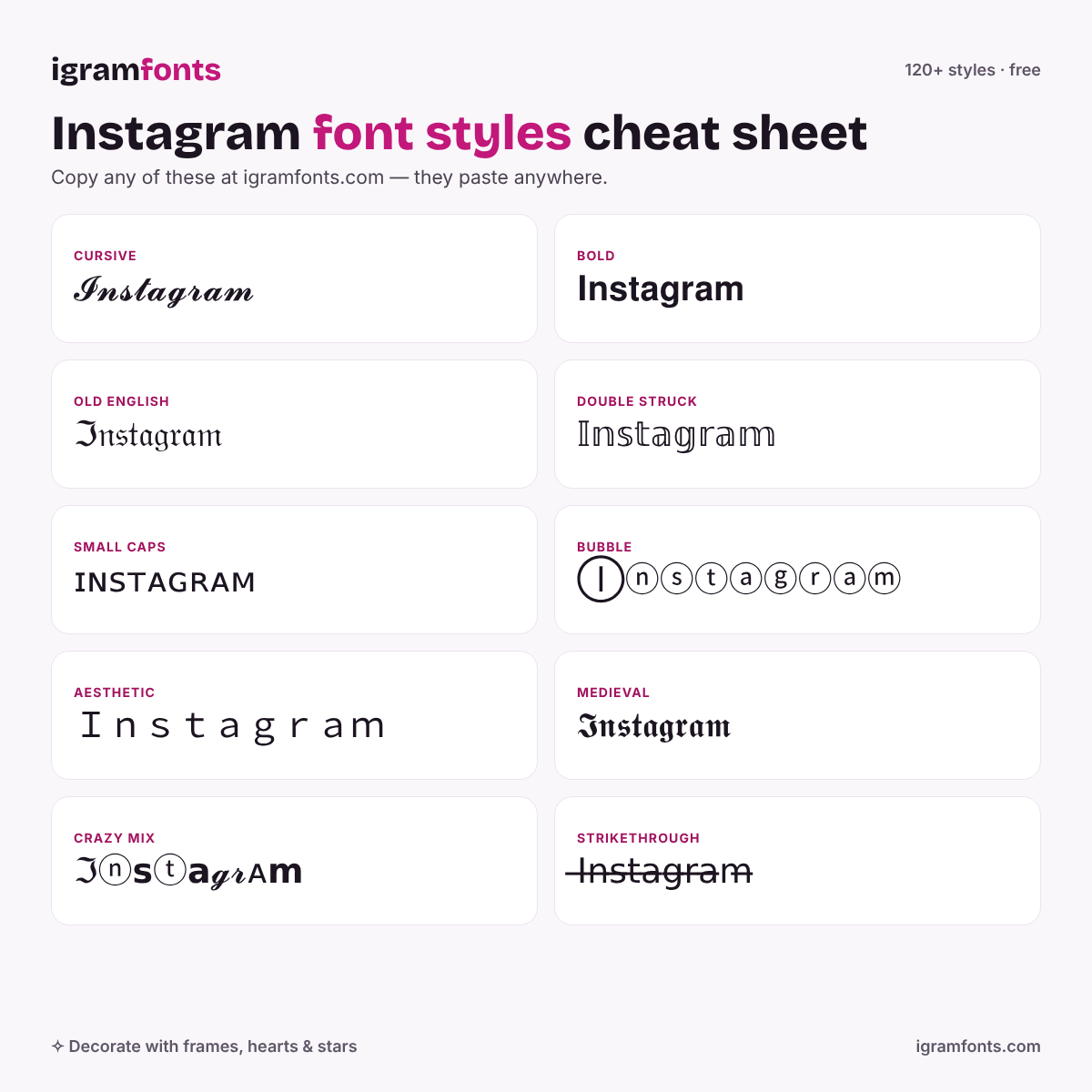
Cursive & script — soft, elegant handwriting. The most-copied style for names and love quotes.
Bold — strong and clean. Best for headlines in captions and business profiles.
Old English — the gothic, tattoo-style look. Great for attitude and gamer names.
Small caps & tiny — minimal and aesthetic, perfect for bios.
Bubble & squares — round or boxed letters, playful and easy to spot.
Aesthetic — wide vaporwave text, spaced letters and soft frames like ☁︎ ⊹ ✧.
Colour names — emoji letters that show in colour (blue, red, black) on most phones.
Crazy & mixed — every letter from a different style, plus Russian-look, squiggle and hacker text.
Lines — strikethrough, underline, slash and dotted marks on every letter.
Gamer & decorated — clan-style frames for Free Fire, BGMI and PUBG names.
Decorate: themes, frames and faces
Every style has a ✨ Decorate button. Inside you'll find themes made for how people actually use Instagram — Attitude, Cute, Boys, Girls, Love, Sad, Gamer, Cricket, Festival, Royal, Aesthetic, Dark and Bricks — each with ready-made combinations of your name. Tap Load more for fresh combos any time.
Prefer to build your own? Stack frames (⟡ ꧁ ꧂ 『 』), hearts (♡‧₊˚), stars (⋆⭒˚.⋆), emoji pairs (🍓🥛, ☁️🤍), faces (ʕ•ᴥ•ʔ), symbols between letters and line marks. Pin your favourites so they're at the top next time, or hit 🎲 Surprise me.
Tips for a profile that looks good (and still gets found)
- Keep your name searchable. Search reads plain letters better, so style one word or add symbols around a readable name: ♡ Priya Sharma ♡ beats a fully styled name.
- One fancy line per bio. A styled first line plus plain details reads well: 𝓓𝓻𝓮𝓪𝓶 𝓫𝓲𝓰 ✨ / Photographer · Pune.
- Check the preview. Use 👁 to see spacing and length before you paste.
- Watch the length. Some styles and decorations use extra characters, so long names may hit Instagram's 30-character Name limit.
- Test on your phone. If you see boxes ☐, pick another style — that one isn't supported on your device yet.
Questions people ask
Are these real fonts?
No — they're Unicode characters that look like styled letters. That's why they stay styled after you paste them into Instagram or any other app, and why there's nothing to download.
Is igramfonts free?
Yes. Every style, decoration and feature is free to use, with no sign-up.
Do Instagram fonts work on Android and iPhone?
Yes. Copy and paste works the same on both. A few rare symbols may look slightly different between phone brands.
Why do some letters show as boxes?
Your phone doesn't have that character yet. Choose a different style, or update your phone's software to get newer symbols.
Can I get a blue or coloured name on Instagram?
Instagram has no coloured text. Our colour name styles use emoji letters that phones draw in colour, so the exact look depends on the phone.
Can I use fancy fonts in my Instagram username?
No. Usernames only allow letters, numbers, full stops and underscores. Use stylish text in your Name, Bio, captions and comments.
Will fancy fonts hurt my reach?
Using them in your bio or a caption headline is fine. Keep your name and important keywords readable so people can still find you in search.
Do these fonts work on WhatsApp, TikTok and games?
Yes — anywhere you can paste text. Many people use the Gamer and Crazy styles for Free Fire, BGMI and PUBG nicknames.